Smart meters are built to send accurate readings automatically, so your bills are based on real usage rather than an estimate. But every so often, a meter stops communicating, and it is worth understanding why, because it is very rarely the meter itself.

DID YOU KNOW?
Smart meters use two separate networks to communicate: one inside your building, and one that carries data across the country. If either one drops, automatic readings stop, and billing quietly reverts to an estimate.
Why Would a Smart Meter Stop Communicating?
Smart meters are built to handle years of continuous use without fault. It is very rare for a meter to record usage incorrectly; the far more common issue is a break in communication, not a broken meter. The one exception is an older meter that has passed its certification date, in which case an upgrade is offered as standard.
How Does a Smart Meter Actually Communicate?
Every reading takes a two-hop journey before it reaches us, shown in the diagram below.
Wide Area Network (WAN): operated by the Data Communications Company (DCC) and overseen by Ofgem, this is the network that carries your meter’s data out to us. It’s how we send accurate bills.
DCC (Data Communications Company): is the single national network that connects every smart meter in Great Britain to every energy supplier. It’s a regulated, licensed body, not us, not you, which is why switching suppliers doesn’t mean losing your meter’s smart functions.
Home Area Network (HAN): a short-range, secure network inside the building that lets the meter, communications hub, and display talk to each other. The communications hub is effectively the powerhouse of the whole setup.
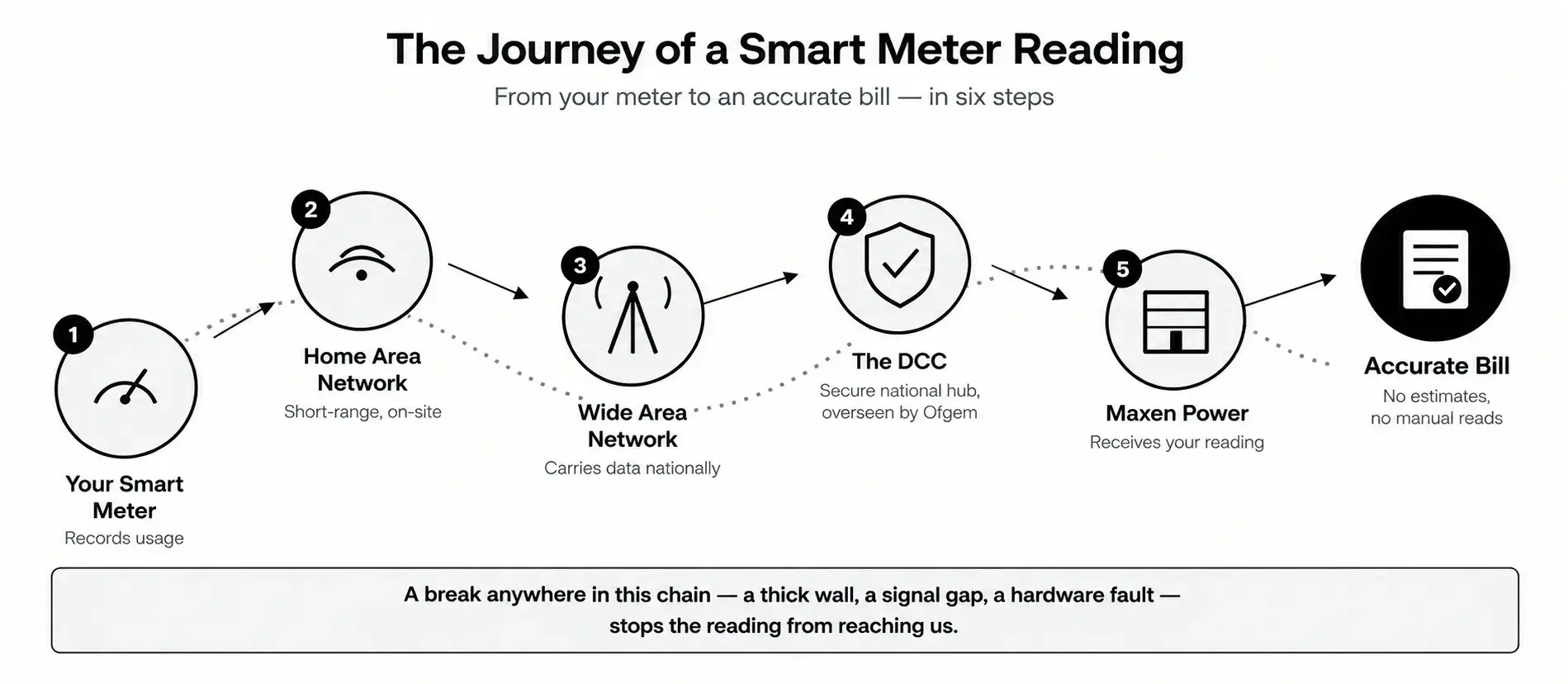
The journey of a smart meter reading, from your building to an accurate bill.
What Causes Connectivity Issues?
- Signal dead spots: basements, thick stone or metal-clad walls, and below-ground meter locations can all weaken WAN coverage.
- Distance between devices: if meters or displays sit far apart, or are separated by several walls, the HAN signal can struggle to reach.
- Older meter generations: SMETS1 meters are not compatible with newer 4G communications hubs, which is why they are gradually being upgraded to SMETS2.
- Network phase-out: as 2G and 3G networks are retired in favour of 4G, some older comms hubs need replacing to stay connected.
DID YOU KNOW?
SMETS1 was the UK’s first generation of smart meters, and many lost their smart functions the moment a customer switched suppliers. SMETS2 meters fixed this by connecting through the national DCC network, so they stay smart no matter who supplies your energy, which is why older SMETS1 meters are being upgraded as standard.
What Are We Doing About It?
- Upgrading SMETS1 meters to SMETS2 as standard, at no additional cost.
- Replacing older communications hubs with 4G-compatible ones as part of the same visit.
- Investigating signal-boosting options for properties with known dead spots or unusually thick walls.
Helping your business go smart: if your business has not switched to a smart meter yet, our team can arrange installation as part of your contract with Maxen Power at no extra cost, and with minimal disruption to your site.
What Should You Do If Your Smart Meter Loses Connection?
If your smart meter stops communicating, it will still function as a normal meter. You will just need to provide manual readings in the meantime. Before contacting us, it helps to have the following ready:
- Distance between meters: the gap between your gas and electricity meters, and anything obstructing the path between them.
- Property construction: brick, stone, metal-clad, etc.
- Meter location: outside, cellar, under stairs.
- Recent changes nearby: new insulation, scaffolding, a new wall.
- A photo of the meter showing its serial number and surroundings.
Whether your smart meter has lost signal or you have not gone smart yet, our Metering Operations Team is here to help. Contact us to check your connection status or to arrange installation as part of your Maxen Power contract.
Some connection issues can only be fixed on site. If our metering team needs to visit for a repair or exchange, we need access to your meter. Please make sure it is accessible when our engineer arrives, and that someone is available to let them in if needed. If you have any meter communication issues or would like to book a smart meter. Please contact our Metering or Support Team to get your issue resolved.